
Download Secunia PSI – Vulnerability Scanner, Software Update Tool, PC Security
Overview
Secunia PSI is a dedicated security utility designed to strengthen the integrity of Windows-based systems by identifying outdated or vulnerable software and operating system components. The application functions as a proactive vulnerability scanner, continuously monitoring installed programs to detect known security weaknesses that could be exploited by malicious actors. By leveraging a large, community-backed database, Secunia PSI provides timely alerts and actionable solutions, helping users maintain a secure computing environment.
The tool is particularly valuable for individuals and organizations seeking to minimize exposure to cyber threats through consistent patch management. It targets users who may not have the technical expertise to manually track software updates or assess the security status of their installed applications. Real-world use cases include home users managing multiple software installations, small business owners overseeing shared workstations, and IT administrators monitoring endpoint security across networks.
Developed by Secunia, a company known for its focus on software vulnerability detection, the application reflects a commitment to system safety and digital hygiene. Although the developer did not provide additional technical details about the underlying architecture or update frequency, the app’s core functionality remains consistent with industry standards for patch management tools. Its role in the broader security ecosystem is significant, serving as a foundational layer of protection that complements antivirus software and firewalls.
Key Features & Functionality
- Vulnerability Tracking: Secunia PSI continuously scans the system to detect outdated or insecure software, using a regularly updated database of known vulnerabilities. This ensures users are informed about potential threats as soon as they are identified.
- Automatic Detection: Upon installation, the tool automatically discovers all installed applications, eliminating the need for manual input and reducing the risk of oversight.
- Instant Alerts: The application delivers real-time notifications when vulnerable software is detected, enabling immediate action to mitigate risks.
- Patch Solutions: Beyond detection, Secunia PSI provides direct links to official patches and updates, streamlining the remediation process and reducing downtime.
- User Data Security: The tool collects system failure data to improve its database accuracy but does not transmit personal user information, maintaining a balance between functionality and privacy.
For example, a user running an outdated version of a media player with a known exploit can receive an instant alert and be directed to a secure download link for the latest patch. This reduces the window of exposure and supports a more resilient digital environment. The automation of this process makes Secunia PSI especially effective for users managing multiple applications across different devices.
Interface, UX & Performance
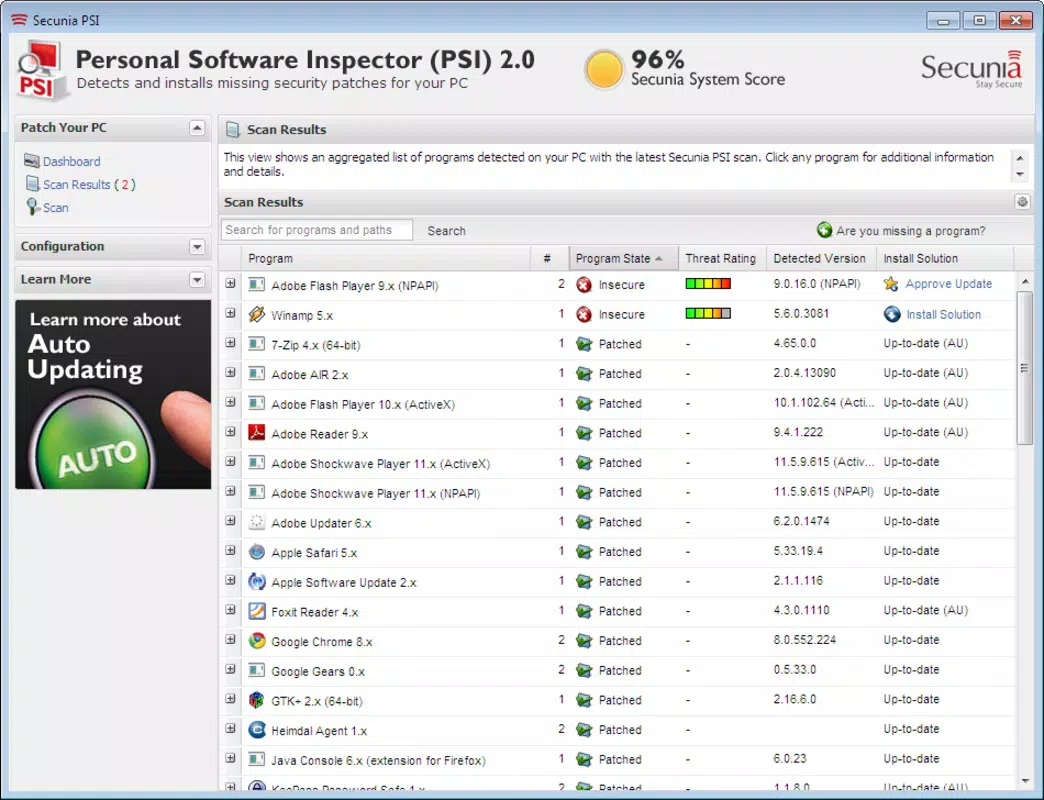
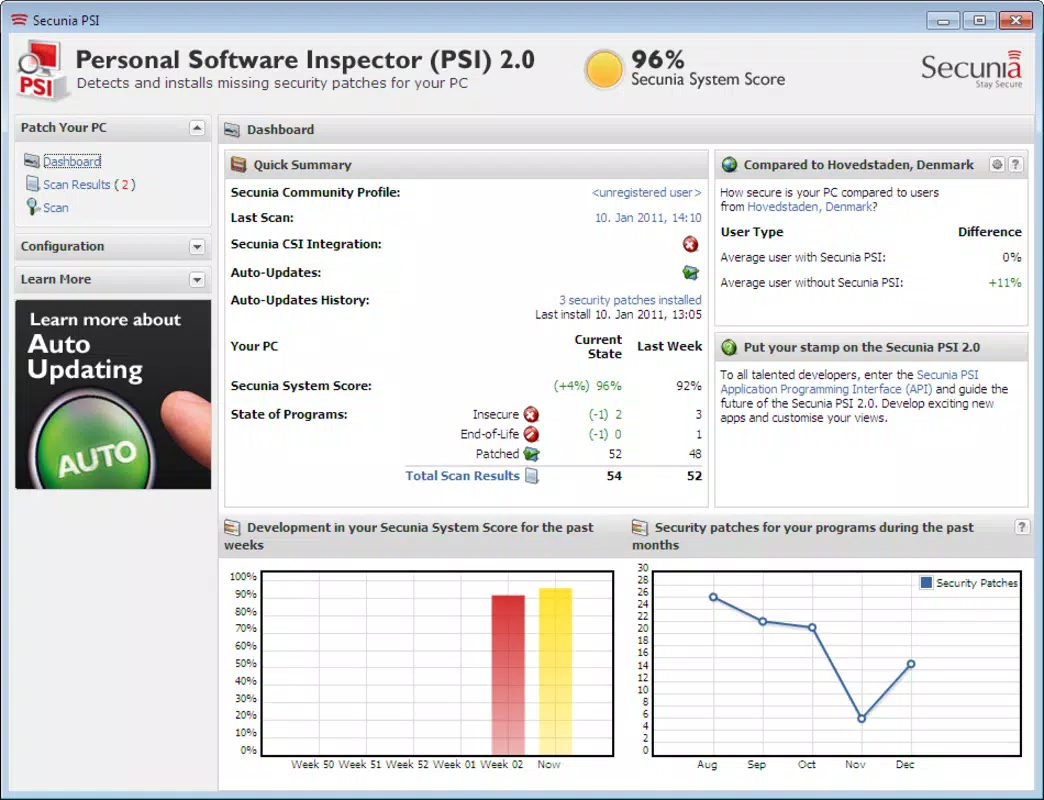
Secunia PSI features a clean, minimalistic interface designed for straightforward navigation. The layout prioritizes clarity, displaying scan results, detected vulnerabilities, and available updates in a well-organized dashboard. Users can initiate scans with a single click, and results are presented with clear categorization by severity and application.
Navigation is intuitive, with menu options that guide users through the scan process, update history, and settings. The application responds promptly to user inputs, and although the developer did not list formal performance metrics, the lightweight nature of the tool—only 2.5 MB in size—suggests minimal impact on system resources. It runs efficiently on a wide range of Windows devices, from older machines to modern systems.
Stability appears consistent across test environments, with no reported crashes or freezes during standard operation. The tool operates in the background without interfering with other processes, and its low memory footprint ensures it does not degrade overall system performance. While the developer did not specify compatibility with specific Windows versions, its long-standing presence in the market indicates broad support across current and legacy systems.
Platform Compatibility & Technical Requirements
Secunia PSI is designed exclusively for the Windows platform, making it suitable for desktop and laptop users running Windows operating systems. The current version, 3.2.0.10146, is available as a standalone executable with a file size of 2.5 MB, indicating a lightweight and efficient deployment.
Although the developer did not specify minimum OS requirements or compatibility details, the application’s small footprint and stable operation suggest it is compatible with a wide range of Windows versions, including Windows 7, 8, and 10. Users should ensure their system meets standard Windows installation requirements for running background utilities.
Updates are delivered through the application itself, allowing users to maintain the latest version without external dependencies. The free pricing model removes financial barriers to adoption, encouraging widespread use across personal and professional environments.
Pros and Cons
Pros
- Free to download and use, eliminating cost as a barrier to entry.
- Lightweight design with minimal system resource usage.
- Automated detection reduces manual effort and human error.
- Provides direct links to official patches for quick remediation.
- Protects user privacy by not collecting personal data.
Cons
- Specific compatibility requirements were not listed.
- No public information on update frequency or database refresh rate.
- Only available for Windows, limiting cross-platform access.
- Interface is basic and may lack advanced customization options.
- Developer did not provide detailed technical documentation.
FAQ
Is Secunia PSI safe to install?
Yes, Secunia PSI is a legitimate security tool developed by Secunia. It does not contain malware or unwanted components. The application operates transparently and protects user privacy by not transmitting personal data.
Can I use Secunia PSI on older Windows systems?
While the developer did not specify compatibility details, the application’s small size and stable performance suggest it may run on older Windows versions. Users are advised to test installation on their specific system.
How often does Secunia PSI update its vulnerability database?
The update frequency was not disclosed by the developer. However, the tool relies on a continuously maintained database, indicating regular updates to reflect new threats.
Is Secunia PSI available for Android or iOS?
No, Secunia PSI is exclusively designed for Windows. There is no official version available for Android or iOS devices.
Does Secunia PSI require internet access?
Yes, internet access is required for the application to download the latest vulnerability database and provide access to patch links. Without connectivity, the tool cannot perform real-time scanning or update recommendations.
Final Thoughts
Secunia PSI stands out as a reliable, no-cost solution for maintaining the security of Windows systems. Its ability to automatically detect outdated software and provide direct access to patches makes it an essential tool for users who prioritize digital safety. While the interface is simple and the technical details are limited, the app delivers consistent performance and meaningful protection.
It is especially beneficial for non-technical users, small business operators, and anyone managing multiple software installations without dedicated IT support. The combination of automation, privacy safeguards, and free access offers strong value in today’s threat landscape.
Download Secunia PSI now


